Check the maps below for directions, the Salmon Arm Snowblazers parking lot isn’t easy to find so study the map or join the convoy leaving Tim Horton’s on 58th Street Vernon at 8:30am.
This is going to be a slightly faster ride with speeds up to 80kmh on open Forest Service Roads and a pace of 30-50kmh on trails. If you’re not able to maintain 30-50kmh on trails please check back for future rides to attend.
The Fly Hills has an amazing variety of trails and numerous viewpoints.
When Join the convoy leaving Tim Hortons on 58th Street Vernon at 8:30am. We are aiming to have our pre-ride safety meeting and being ready to ride at 10:00am.
Trail Difficulty Rating Intermediate level and above riders will enjoy this ride which combines a mix of Forest Service Road, old logging/skid trails and snowmobile trails.
Ride Speed Speeds will reach up to 80kmh on open Forest Service Roads and will be at a sustained 30-50kmh on trail sections. Please skip this ride if you can’t do this speed, there will be more leisurely rides in the coming weeks.
Trailside Bathrooms We are riding past a few recreation sites and snowmobile cabins for those needing an outhouse.
Viewpoints and Breaks There will be a few breaks to take in the views, for snacks and a longer lunch break with a campfire so bring something to toast over the fire.
What to Bring
Food and drink for a day riding
Clothes for all weather conditions, we ride in all conditions!
Your standard ATV emergency supplies
A chainsaw or handsaw, we haven’t ridden here all summer so there may be trees down.
A single tank of fuel will be adequate for the entire ride.
Vernon ATV Club and events are open to everyone, we encourage new riders to come out for a couple of rides to meet club members, find new trails and get a sense of the club before joining.
Our ride leaders are either busy or recovering from injuries for the next weekend or two so there probably won’t be any organized club rides so head over to the Vernon ATV Trail Riders Facebook Group. The group is a great way to ask questions, share photos and meet up with other riders looking to head out on the trails.
Try these rides
Create a free account on GaiaGPS to download the GPX files (or a discount on Gaia GPS Premium for extra features) for these rides, load the files on your GPS then get out there.
The Epic 250 isn’t for everyone but it isn’t as long as it sounds. Starting from King Eddy staging with 20 litres (or more) of extra fuel, we did it in just under 10 hours with several stops and a maximum speed of around 60kmh.
Skimikin Lake (parking lot before entering the campground) northwest of Salmon Arm is the staging area for this fun ride that accesses a vast trail network of forest service roads and snowmobile trails.
Mt Ida is northwest of Enderby on Deep Creek Road and has an amazing network of trails with views of Salmon Arm and Shuswap lake and diverse trails from rainforest cedars to Okanagan dryland fir/pine forest and everything in between.
Trinity Ricardo Trail Network is a hidden gem that takes riders up to the Silver Star Park Boundary (no ATVs in the park!). Tolko is logging in this area so weekday riding is not advised and watch as they may be logging on weekends with winter on the way.
Motorized vehicles yield to cyclists, pedestrians and horses
A little courtesy goes along way to protecting access to trails and fostering relations with other trail users.
Many cyclists, pedestrians and horseback riders will move off the trail when they hear an ATV coming but this doesn’t mean you should continue past them. Proper trail etiquette calls for the ATV rider to pull to the side of the trail, shut their engine off, remove their helmet (if horses present) and allow the other trail users to pass.
Use Extra Caution Around Horses
Horses can be unpredictable and spook when scared, please use extra caution around horses for everyone’s safety:
Pull to the side of the trail far enough for horses to pass safely as soon as you see them.
Pull to the downhill side of the trail if possible since horses tend to perceive unknown threats on the uphill side as predators.
Shut off your motor as soon as possible and remove your helmet. The horse will be more likely to recognize you as a human.
Speak to the rider and horse in a friendly, relaxed tone.
When approaching horses from behind, stop, call ahead and make yourself known to the rider. Ask them if it is OK to pass and the best way to do so.
Horsemen may pull to the side of the trail a safe distance if they hear an OHV approaching, but this does not necessarily mean it is safe for you to ride by. Stop and wait for instructions from the horseman.
Ask the horseman how he/she would like to proceed.
The horseman will know his/her horse and how the horse reacts to other trail enthusiasts. The horseman may ask you to stay put and ride past you.
The horseman may ride to the side of the trail and ask you to ride or push past them.
If you ride by a horse, keep your rpm’s low and steady and your sound as low as possible.
Sudden movements or sounds can startle horses.
Be alert, aware and on guard for oncoming traffic.
We continue our series on trail navigation and ride planning tools with a look at creating routes and finding public tracks to keep on the plotted course.
Option 1 – Create a Routes In GPS terminology a route is series of waypoints that when followed using your GPS guides you along the intended direction of travel. Most/all GPS apps and devices allow route creation so when riding you follow a coloured line along your predetermined set of directions rather than having to stop at each corner to check the map.
Option 2 – Find Public Tracks If you prefer to follow a track saved by another rider, many of the online GPS services allow you to search existing trails then save or sync to your device.
The existence of a track doesn’t mean you are allowed to or should ride that trail.
Following a track may take you across private land, sensitive terrain, areas closed to ATVs or on difficult trails. Always research where you are riding and be prepared to turn back!
BRMB Web Map with inset of iPhone 7 Map Tools screen. I wasn’t able to find a way to plan a route on the Web Map and transfer it to the App, nor plan on the App.
The BRMB Web Map lets you search “Adventures”, here King Eddy ATV Trails are shown and can be added to a trip or downloaded in GPX or KML format.
Backroad Mapbooks We ruled out using the paper Backroad Mapbooks for detailed ATV ride planning last week so we’re only looking at the GPS Maps and Web Map/App options this week from BRMB.
GPS Maps Every Garmin GPS made since the dawn of time has had Route creation hiding in the menu and the Backroad Mapbooks layers provide additional data on both your handheld GPS and in Basecamp when your GPS is connected to the computer. See the Garmin section below for more information on Route creation.
BRMB Web Map & App Using a PRO account on the BRMB Web Map it’s possible to “Draw a Line” to create a route to follow later, this is then saved and available for download as a GPX or KML file.
Two problems I encountered: a. I couldn’t find a way of importing or opening this route on the BRMB App on my phone.
b. There is no way of “Drawing a Line” on the BRMB App which means route planning via the app is currently not an option.BRMB is pouring a lot of effort into the BRMB Web Map and App so I won’t be surprised to see many more features arriving in the coming months. BRMB is offering a 3 month free PRO trail to ATVBC members, to get your 3 month trial contact ATVBC by email.
To access Public Tracks shared by Gaia GPS users, enable the Public Track Map Overlay.
Public Tracks appear as faint green lines on the map, click a track for more info and to save to your account.
Gaia GPS Using a Free or Premium account at Gaia GPS lets you browse Public Tracks shared by others and create your own Routes. Looking at Tracks shared by others is a great way to explore new areas and fill in gaps in your trail database.
It’s also possible to create Routes which are saved in your account and instantly available for use on other devices signed in to your Gaia GPS account.
Using Backroad Mapbooks and Gaia Topo map layers to quickly plan routes on your computer, tablet or smart phone.
Garmin Basecamp route creation and inset of Garmin GPS screen with Routes highlighted.
Garmin Route creation has always been an important feature in Garmin devices and Basecamp. A route can be created directly on your handheld GPS through the Routes menu or in Basecamp by clicking the Create a Route button under Creation Tools at the top of the screen. Once created in Basecamp the file must be sent to your handheld GPS for use.
As we saw last week, the amount of information available via Basecamp is dependent on having Garmin BirdsEye, Topo or Backroad Mapbooks data otherwise the default beige screen provides no navigational assistance.
Search the map for trails shared by other riders, the left sidebar shows ride data, photos and links to a full description and download options.
Wikiloc One of the main benefits of community contributed content is the ability to see, download and use files added by fellow riders. It’s also possible to create a route on the webmap by using the “Draw your trail by hand” feature found under the Upload Trails option.
The trail detail page has a detailed description of the ride, photos, a list of waypoints and trails in the vicinity and download options ranging from transfer to the Wikiloc App, GPX, Garmin, Suunto and more.
Stay Tuned! Next week we take public tracks or Routes we’ve created and load them onto our chosen chosen GPS device/app so you can navigate the intended route.
It takes years of experience to become a grizzled veteran trail rider that remembers all the roads, trails and intersections. A well kept secret of grizzled veteran trail riders is they are usually exceptionally good at using a GPS to track rides and have an abundance of previous ride tracks at hand when riding in the area again.
Exploring with no plan can be hugely rewarding and take you places most have never been, but it can also be fruitless and result and hours wandering forest service roads that dead end in cut blocks. Knowing how to find where trails are and then navigate those trails while riding can up your game from group ride follower to intrepid backcountry explorer.
Navigating new trails and riding areas can be broken into three steps:
Ride Planning – how to find trails
Ride Navigation – staying on the plotted course
Ride Tracking – saving your track for future use
This week’s email starts with a look at Ride Planning tools. Check in over the next couple of weeks for parts 2 & 3 covering Ride Navigation and Ride Tracking.
Part 1 – Ride Planning Until you’ve built a database of trails you’re either going to do a lot of riding to find trails or you can access trails shared or published by others.
Even just a few years ago your options were basically limited to purchasing a chip for your GPS which provided a layer showing roads and trails. With the explosion of online services and apps these same trails can are available from a variety of sources with most offering free access to a limited feature set with premium paid options and in app purchases.
Myra-Bellevue Provincial Park, Page 10 Thompson Okanagan Backroad Mapbook
Duffy-Greenstone Trails – MicroSD Card BC GPS Maps for Garmin
Backroad Mapbooks The homegrown success story, BRMB is based in BC and has been a popular option for ATV riders looking for trails for years. You’ve probably seen and/or used their paper mapbooks found in convenience stores, purchased a GPS chip for your Garmin or more recently accessed their information via smartphone GPS apps.
Paper Mapbooks – $29.95 + up The 5th edition of the Thompson Okanagan Backroad Mapbook provides 51 maps at 1:200,000 scale covering the region. A good backup if your GPS quits and an effective tool for overall route planning but often not enough detail for ATV level route planning.
Also available as an ePUB or PDF file for use on your favourite smartphone, tablet or eReader. Note the ePUB/PDF is not georeferenced meaning you don’t know your position on the map.
GPS Maps – $69.95 + up The 2020 version of Backroad GPS Maps for BC provides province wide coverage to a 1:20,000 scale. Much more than just ATV roads and trails, other information types include: lake/river/stream data, private land, wildlife management units for hunters, oil and gas location data, railway corridor markers, searchable points of interest and trails for all types of recreation users.
Compatible with Garmin Basecamp when connected to your GPS device with the SD card installed for trip planning on your Mac or Windows computer.
The Free BRMB Web Map is effectively useless for planning, all options/features prompt to sign up for a PRO (paid) account.
The BRMB Web Map is chockablock with data, features and resources when accessed with a PRO account.
Once logged in at the PRO account level the features spill forth from all sides. Satellite and Topo maps are available, Backroad, Fishing, Hunting, Paddling, Park, Recsite, Trail, ATV, Snowmobile, Wildlife and Winter Adventure buckets contain numerous options that can be toggled on the map.
Access the Web Map on your computer or tablet or download the app to your Android or Apple smartphone.
Pricing is listed below or visit the BRMB website:
Free – unlimited basic platform access
$3.50/month – month to month access to the PRO platform
$35.00/year – year round PRO platform access
$90.00/3 years – 3 year subscription to PRO platform
Use Gaia GPS on your computer, tablet or smartphone to find trails shared by others or create your own routes on the map using the planning tools then follow them on your smartphone for navigation.
Gaia GPS A webmap and app for all types of recreational activities, Gaia GPS has undergone extensive updates to both the website and the Android and Apple apps in the 5 years I’ve been subscribed.
After purchasing an iPhone 7 Plus in 2016 I decided to make the move away from traditional GPS devices to using a smartphone GPS app. After testing 10+ apps that were available then, Gaia was my winner based on cost and features. Each year I review competitors and I still haven’t found a better GPS app for my purposes.
Use the webmap on your computer or tablet for planning rides. A free account is required to access the map, this limits you to basic map layers but gives the ability to view and save tracks shared by others.
Being able to search and save tracks shared by others means a nearly unlimited number of trails at your disposal.
Without TOPO Maps and BirdsEye imagery Basecamp leaves something to be desired for ride planning.
Garmin The dominant player in the consumer GPS market, Garmin leads the way in dedicated handheld and dash mounted GPS products for ATVs.
On the ride planning side BirdsEye and TOPO maps can be purchased to add details to your GPS device and will load onto Gamin Basecamp when your GPS is connected to your computer. Without BirdsEye and TOPO Maps Basecamp doesn’t provide much information to do ride planning.
Basecamp is used to download tracks and send routes/waypoints to your GPS.
Garmin doesn’t currently have an online webmap or shared community trails database that I’m aware of.
A free Wikiloc account lets you filter by activity type, search by trail name, find trails on a map and download GPX files shared by others with a paid option for Premium features.
Wikiloc Wikiloc is another excellent online community style webmap and app for all types of recreational activities.
A free Wikiloc account lets you search trails by name, activity type or location on the world map, download trails shared by others (tracks are simplified to 500 points for free accounts) track rides and upload your trails. It is possible to create a route on the webmap by using the “Draw your trail by hand” feature found under the Upload Trails option.
Download the Android and Apple apps to try Wikiloc for your next ride.
And all the others? Oh ya, there are too many other options to list so we’ve stuck to the most popular tools used by ATVers for GPS navigation apps and planning tools. Let us know what you use so we can compare and share with others.
Stay Tuned! Next week we will look at how to download tracks or create routes and transferring them to your chosen GPS device/app so you can navigate the intended route.
Safety is one of the key drivers of the ATV Club. We all share a love of the backcountry and want to ensure everyone makes it home safely after every ride.
This past weekend a Saturday evening ride started out perfectly with the small group enjoying the clear skies and warm evening temperatures. As the ride ventured up Bardolph Road it turned onto an old logging road that was new to the group. It was a postcard trail, the old roadbed was smooth and in great condition and followed a creek draw at a moderate incline through the cedar forest.
Enjoyment quickly turned to apprehension however because shortly after crossing the creek the trail narrowed and became steep and rutted. This section of trail was still passable though which encouraged riders to continue up the steep slope. The point of no return appeared after riders committed to continue upslope where a large exposed tree root created a 12″ vertical ledge on the already steep trail.
The side x sides and 2 up quads cautiously navigated the vertical ledge but the front end on single seater quad wouldn’t stay down without help from other riders in the group. This group was fortunate because the other riders were experienced, spotted the hazard and held the single seater quad to prevent it from flipping backward down the hill.
Inexperienced riders or someone riding by themselves would have been forced to make a split-second decision to try climbing the ledge or get stopped on the steep incline then somehow back down.
Identifying & Reporting Hazards In the example above the ATV Club is going to place a sign warning riders of the steep hillclimb ahead so they have the opportunity to turn around in a safe area rather than being stuck in a dangerous situation on the steep hillside.
We want your assistance identifying potentially dangerous trails and hazards so they can be assessed and mitigated through signage, trail work and education.
Please share what you see while out riding by taking photos and providing a description of the location or send a GPS waypoint (if possible) to the Vernon ATV Club by email info@vernonatvclub.ca, via our website or Facebook.
A handful of Vernon ATV Club members have tracks on their quad or side x side, if you’re on the ATV Trail Riders Group you’ve seen photos and stories throughout the winter.
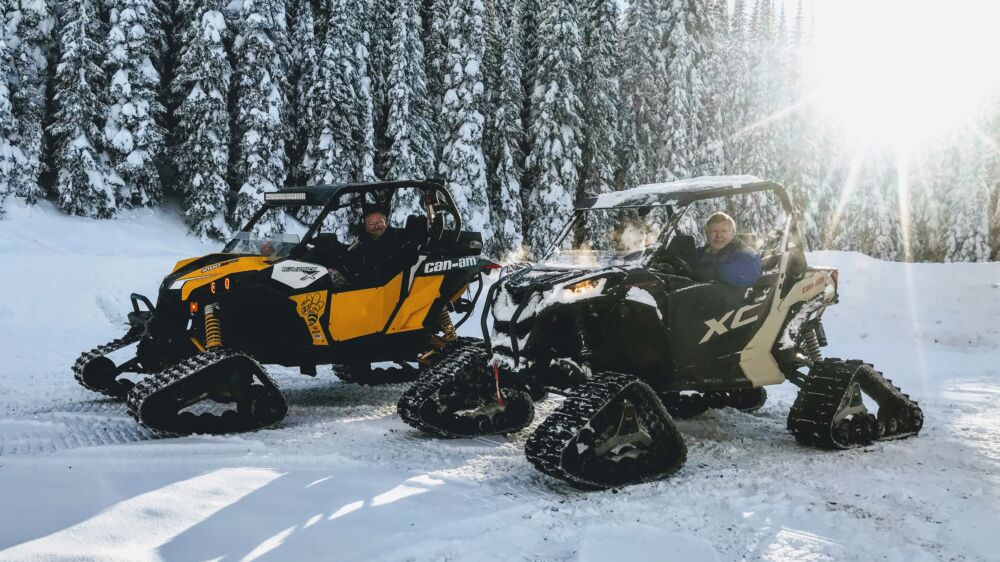
Inevitably the tracked rider ends up doing tow truck duty at various times when wheeled machines find the limits of how far they can go in the fluffy stuff.
Rescuing wheeled ATVers in the winter is only part of the gig, what are some of the pros and cons of ATV tracks?
Pros
Turns your quad, side x side or dirtbike into a 4 season toy.
You only need to maintain/store/accessorize/insure 1 vehicle.
Tracks are less expensive and more reliable than many (most?) similarly priced sleds.
Gets you out on the mountains to be above the low valley cloud so common through Okanagan winters.
Cons
New tracks range in price from $3500-8500 so they’re definitely not cheap but you can often find deals on lightly used track kits in the classifieds.
Not terribly fast and not for steep slopes, you’ll never beat a sled here.
If you get a track machine stuck you’ve discovered what a 2000lb anchor looks like.
Rough riding on hardpacked surfaces.
Tracks gear your machine down and pushing through snow creates a lot of resistance so you’ll use 25-50% more fuel to go the same distance.
Get in touch with the club by email if you have questions about tracks and watch upcoming emails for more stories about tracks before they’re safely stored away for the summer.
With thoughts turning to the trails we see a surge in new and renewing memberships at this time of the year. It’s time to park the sled, skis or snowboard and what better way to avoid yardwork than heading out riding with your ATV buddies.
If you’re new to ATVing or the area you’ve found the right club. Our members love riding, sharing their favourite trails, and protecting the backcountry we all enjoy so much. As soon as this COVID thing is figured out we’ll be back to hosting regular club rides too.
You can keep up with the club through these weekly emails, look back through past articles on our website at www.vernonatvclub.ca, or our Facebook Page.
We also encourage you to join the Vernon ATV Trail Riders Facebook Group where you’ll find people interested in riding, get answers to questions and see photos and ride stories.
If you have any questions get in touch with the club by email info@vernonatvclub.ca.
Welcome to the club, we’ll see you on the trails soon!
Warm weather continues to push the snow back on the trails enough to start getting back on 4 wheels.
A recent trip to Postill Lake rewarded with some open technical trails lower on the mountain and well traveled snow trails at higher elevations. The snow softened quickly in the afternoon so if you’re out riding this weekend remember to ride with some buddies while maintaining your safe COVID distance.
Think Safety Our riders have an excellent safety record so keep up the great work and safe riding. Remember at this time of year morning conditions are usually icy and afternoon conditions leave machines high centred miles deep in the back country.
Safety, parking, littler, noise, dust, hours of operation… there’s a lot to think about when pulling up at your favourite trailhead staging area.
All ATVers need to remember that we’re judged by the tracks we leave behind and that starts with how and where we park. If a local resident, rancher or hiker drives by and sees piles of garbage, burnout marks on the road or an abandoned campfire it sure doesn’t look good for us.
Safety Almost every staging area is near or on a Forest Service Road (FSR) so in addition to other recreational users whether they be fellow ATVers, fisherman, hunters, firewooders, a bunch of young folks heading out with a pickup load of pallets to party or commercial and industrial traffic, there can be a lot of vehicles passing the staging area.
Legal Parking Areas
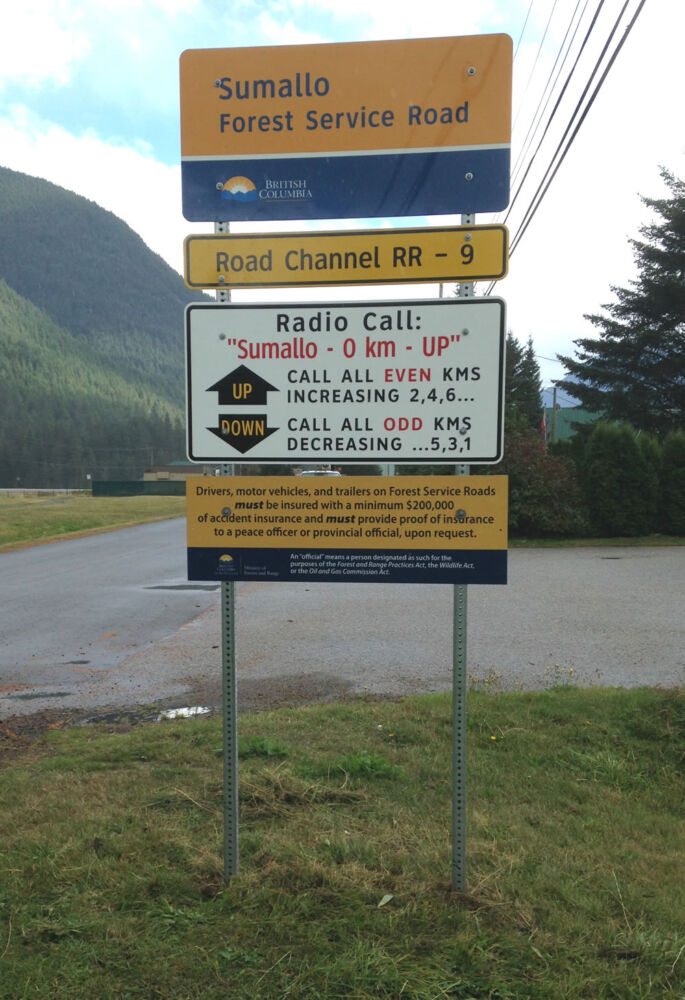
FSR signs are posted at the start of an FSR system where there is potential for public or multiple industrial users.
You’ll usually see these at or near where the pavement ends or on dirt roads where it switches from municipal/private roads to the FSR.
The FSR sign indicates ATVs are allowed to ride on the road beyond this point.
ATVs should only unload before this sign if there is a clearly identified parking/unloading area for ATVs and be aware that you may need the ICBC Basic Autoplan if you’re unloading in a parking lot that is part of the public highway system.
Parking
If you’re not familiar with a staging area or if appears to be a popular spot for parties it may be wise to pull over and inspect the parking area for broken glass and campfire nails before you drive in.
Many staging areas have limited parking or areas that are better left for trucks and trailers. Take a look around before you park, if you have a pickup try to find a place where you can safely unload while leaving larger spots and turnaround areas for trucks and trailers.
Observe how other people have unloaded and if they load off the side or back and leave enough room so they can get their machine on their ramps if parking behind other vehicles that have already unloaded.
When parking pull as far as safely possible off the FSR so vehicles can pass and don’t park anywhere that’s going to put you or oncoming traffic at risk. Never park anywhere that may interfere with commercial or industrial traffic, we’re out playing but they’re out making a living.
Don’t block the road and keep all little people and pets under control at all times.
Litter No matter where an ATV travels they should never be littering and the staging area is often one of the most visible signs of all-terrain vehicle activity. If you spot garbage near your vehicle pick it up, we’ll all look better and you’ve done a good deed for the day.
Be a Good Neighbour: Noise, Dust & Hours of Operation
NOISE: In areas with neighbours remember to keep noise to an absolute minimum at all hours of the day by keeping your music turned down, driving slowly and avoid running your ATV engine as much as possible.
A nearby home may be a shift worker or someone who just doesn’t like the sounds of ATVs interrupting their Sunday get together.
DUST: Avoid making dust, drive and ride slowly, limit your riding around the staging area and NEVER NEVER NEVER do bonehead burnouts and donuts in the parking lot.
HOURS OF OPERATION: a group of residents can put pressure on their local government to close riding or staging areas. Do your part by keeping noise and dust down and if you must pass residential areas early or late, keep your speed and noise as low as possible.
Consideration and respect for others can go a long way to help keep riding areas open so we can all enjoy our favourite trails for years to come.